NETWORKPICKER
METHOD / DETERMINISTICREADY
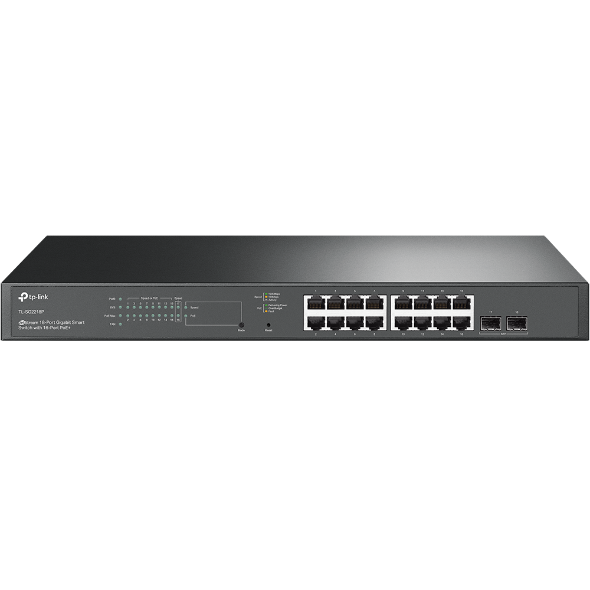
TP-Link Omada SG2218P network switche
VERIFIED RECORDNetwork Switches

TP-Link

TP-Link Omada SG2218P

Model SG2218P V1

TP-Link Omada SG2218P is a managed PoE network switch with 16 × 1 GbE PoE+ (802.3at) ports, 2 SFP slots and a 150 W PoE budget.

Rack-mountable Omada smart switch with sixteen Gigabit PoE+ ports, two Gigabit SFP slots, and a 150 W PoE budget.

Compare this product
Manufacturer-sourced. Core specifications were checked against 1 verified official source — last verified . How we verify data

TP-Link Omada SG2218P specifications

Verified TP-Link Omada SG2218P specifications
Total Ethernet ports16
Rack units1 U
ManagedYes
Maximum power181.4 W
PoE budget150 W
SFP ports2
Ethernet ports16 × 1 GbE · PoE+ (802.3at)
Forwarding rate26.78 Mpps
Switching capacity36 Gbps

Where this product fits

Check port count, link speeds, management, uplinks, and PoE capacity against every device you plan to connect.

Deterministic checks

Access point compatibility

Results check port availability, Ethernet speed, PoE standard, and the declared total PoE budget. Manufacturers are grouped for faster scanning; expand one to inspect every rule.

TP-Link

3 products

201
  • The required Ethernet port is available at the required speed and power standard.
  • The devices may draw up to 14.2 W from a 150 W budget, leaving 135.8 W headroom.
  • The required Ethernet port is available at the required speed and power standard.
  • The devices may draw up to 15.5 W from a 150 W budget, leaving 134.5 W headroom.
  • There are not enough PoE++ (802.3bt) Ethernet ports for TP-Link Omada EAP773.
  • The devices may draw up to 25.94 W from a 150 W budget, leaving 124.06 W headroom.

Ubiquiti

9 products

270
UniFi U6 MeshCompatible
  • The required Ethernet port is available at the required speed and power standard.
  • The devices may draw up to 13 W from a 150 W budget, leaving 137 W headroom.
UniFi U6 ProCompatible
  • The required Ethernet port is available at the required speed and power standard.
  • The devices may draw up to 13 W from a 150 W budget, leaving 137 W headroom.
  • UniFi U6 Enterprise requires 2500 Mbps, but only a 1000 Mbps compatible port remains.
  • The devices may draw up to 22 W from a 150 W budget, leaving 128 W headroom.
  • UniFi U7 Lite requires 2500 Mbps, but only a 1000 Mbps compatible port remains.
  • The devices may draw up to 13 W from a 150 W budget, leaving 137 W headroom.
  • UniFi U7 Outdoor requires 2500 Mbps, but only a 1000 Mbps compatible port remains.
  • The devices may draw up to 19 W from a 150 W budget, leaving 131 W headroom.
  • UniFi U7 Pro requires 2500 Mbps, but only a 1000 Mbps compatible port remains.
  • The devices may draw up to 21 W from a 150 W budget, leaving 129 W headroom.
  • UniFi U7 Pro Max requires 2500 Mbps, but only a 1000 Mbps compatible port remains.
  • The devices may draw up to 25 W from a 150 W budget, leaving 125 W headroom.
  • UniFi U7 Pro XG requires 10000 Mbps, but only a 1000 Mbps compatible port remains.
  • The devices may draw up to 22 W from a 150 W budget, leaving 128 W headroom.
  • UniFi U7 Pro XG Wall requires 10000 Mbps, but only a 1000 Mbps compatible port remains.
  • The devices may draw up to 22 W from a 150 W budget, leaving 128 W headroom.